Protect Your Most Valuable Asset: Implement Security Profiles
In today’s data-driven environment, information may well be your organization’s most valuable asset. Every decision depends on the accuracy and integrity of the data behind it. When that data is compromised, the ripple effects can be costly.
Your database contains sensitive information—pricing, customer records, inventory details, financial data, and more—it must be protected not only from external threats but also from accidental changes made internally.
Security profiles provide a straightforward way to safeguard your data, locking down high-impact fields (pricing, costing, part numbers, customer IDs) to prevent accidental edits. By assigning security profiles to users, you ensure that each person has access to the functions appropriate for their role. In short, security profiles help maintain the integrity of your data by controlling who can see and modify what.
In PowerShift, security profiles consist of program-specific parameters that control:
- if records can be added or deleted
- which field values can be changed
- which field values are displayed
- if an otherwise optional field is mandatory
- whether or not notes can be maintained
You can minimize inadvertent data changes by making most fields display-only for most users. And you can enable appropriate users to maintain the fields that they are directly responsible for to improve accuracy and accountability.
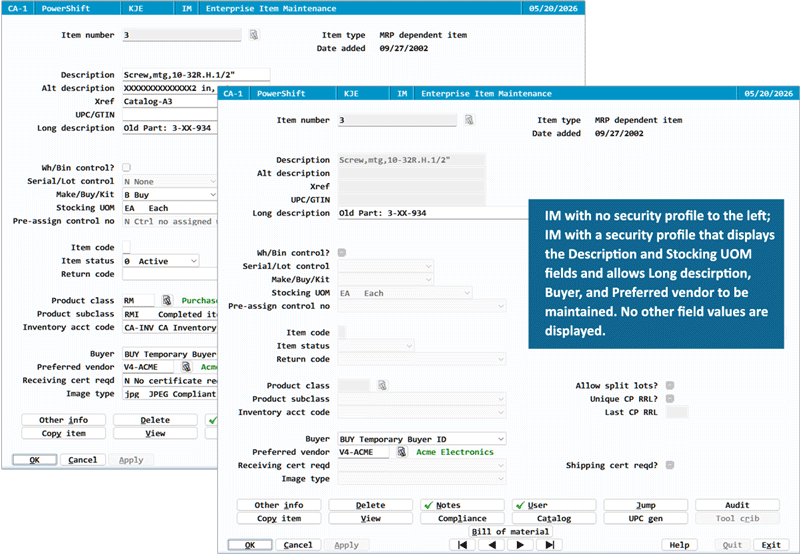
The example below illustrates how you might set up Inventory Maintenance (IM) for the purchasing manager: allow Long description, Buyer and Preferred vendor to be maintained, but restrict changes and visibility of other data. "Hiding" the values of other fields makes the relevant field values stand out.
As another example, you could set up Customer Maintenance (CM) to allow sales managers to change Sales rep and Sales region, but set other fields to display only.
Security Profile Maintenance help (displayed when you enter ?XFLDS at any PowerShift menu) describes how to create security profiles. You can set up security profiles for many programs; you can also control access to document output options.
Implementing security profiles is one of the most effective measures you can take to protect your data. It doesn’t require a system overhaul or an upgrade—just thoughtful assignment of permissions based on job responsibilities. If you have any questions or if you’d like to see the security profile feature in other programs, let us know!